
Entity details
Use an existing entity
To make data entry easier: use an existing entity.
To ensure data quality, please provide all essential data.
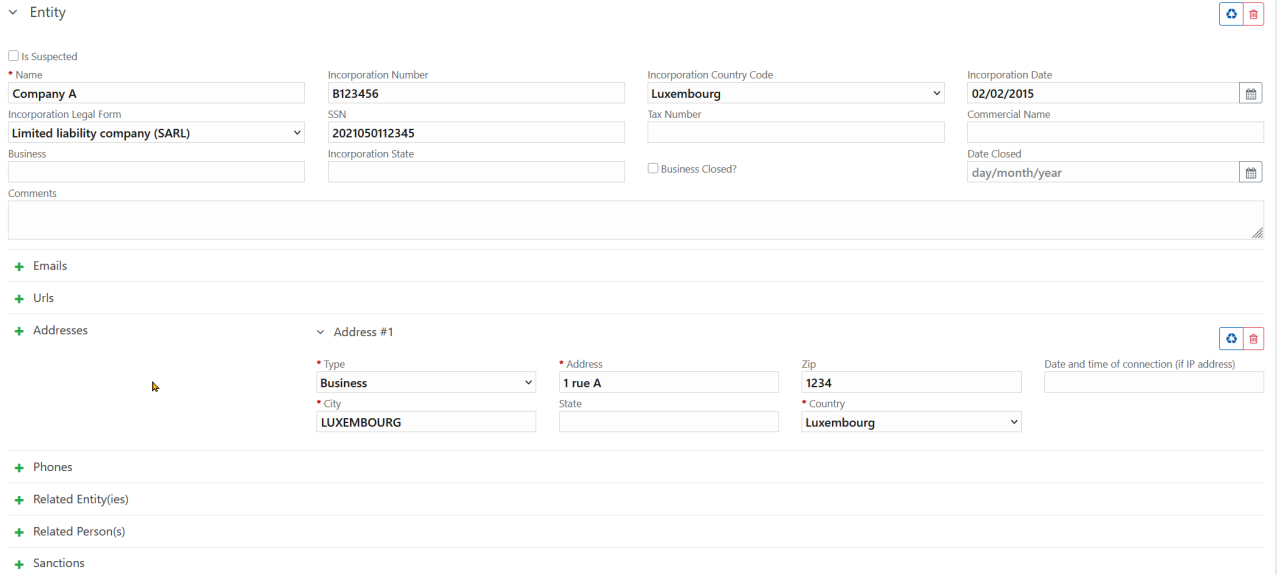
Legal name
This refers to the registered business name as stated in the company’s articles of association (for Luxembourg entities: the name as recorded in the Trade and Companies Register (RCS)).
RCS number – incorporation_number
For Luxembourg entities, the RCS number must be entered without padding, i.e. without zeros, spaces, or any symbol between the letter and the digits. Examples: B123456, F123, A12345
For foreign entities, please indicate the foreign registry number as you know it, and ensure that the correct country of incorporation is selected.
Country of incorporation
Matricule – tax_reg_number
For Luxembourg companies, please enter the entity’s matricule (e.g. 20231234567).
Tax number – tax_number
If known, please enter the entity’s tax number, for example for a Luxembourg company: LU12345678
Trade name
This refers to the name or brand under which the entity conducts its business.
Economic activity
Briefly describe the company’s economic activity.
Liquidated entity
If the entity has been liquidated, the date of liquidation must be provided.
Comments
Any comments regarding the legal person may be added here. However, we recommend including all essential information in the motivation section of the report.
Addresses
Telephone numbers
Related person(s)
The natural person(s) linked to the entity must be entered under this section.
Note: The role of the person in relation to the entity must be specified at the top of the person’s form.
The following roles are available:
- Shareholder
- Executive officer
- Chief Executive Officer
- Beneficial owner
- Director
- Domiciliation agent
- Manager
- Other
- Unknown
Related entity
It is possible to link one entity to another.
By clicking the green + button, a new entity form opens, where you can enter all data of the related entity.
Possible relationships are:
- Shareholder
- Alternative Investment Fund Manager
- Depositary bank
- Director / Manager
- Domiciliation agent
- General partner
- Limited partner
- Accountant
- Transfer agent
- Unknown
Where can the details of an entity be provided?
In the “Transactions” section, the details of an entity (object type) can be entered in the transaction sections: From - Source of funds and To - Destination of funds.

In the “Suspicious Activity” section in the left panel, the details of an entity (object type) can be provided under “Report Parties”.

In reports with AND without transactions
Under the Account object an entity must be provided as: “Account Owning Entity” or "Other Related Entity(ies)".

Last update